In the Risk Matrix tab, you can create a customized risk matrix using ESG scores from your supply chain, along with any additional risks you’ve identified. On the risk definition pages, you can set probability and consequence levels that align with your company’s risk tolerance, ensuring a clear and structured approach to risk management.
Complete the Risk Definition Table
- Risk = Consequence × Probability
- Log in to your Orixe account.
- Go to the Sustainability module
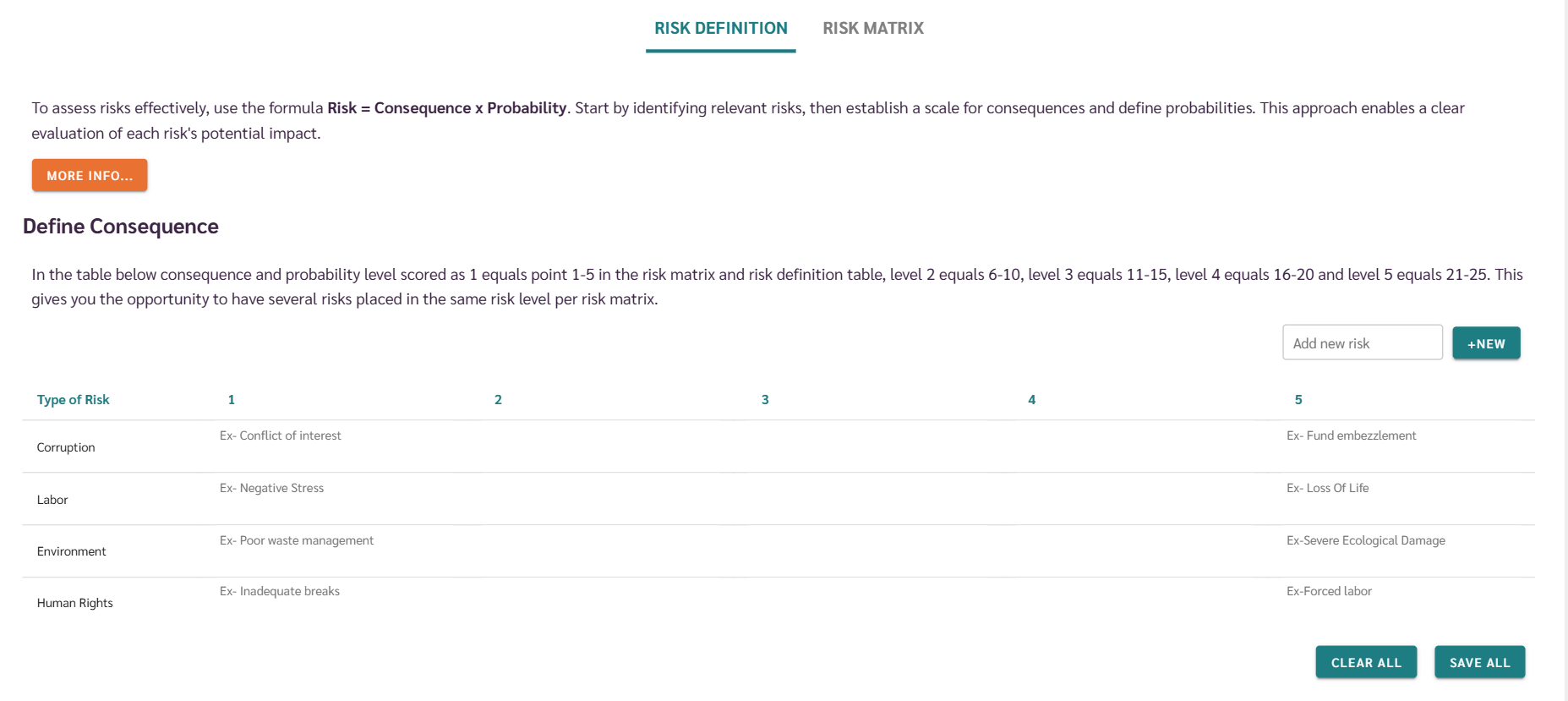
- Click on the "Risk Matrix" tab to automatically navigate to the "Risk Definition" tab
- The user must identify various types of risks that need to be monitored and managed.
- Establish a scale for different potential consequences that could occur.

Define Consequences
- To assist users in effectively filling out the risk assessment table, we provide exemplary texts as shown in the image.
- To add a new category of risk to the table, enter the type of risk in the "Add new risk" field and then click the "+New" button.
- Fill out the table by adding risks to appropriate consequences.
- After adding the details, You should save the table, otherwise the details you added will not be saved.
- If you want to delete all the details in the table, you should click on the delete all button.
Define Probabilities
- We offer default probability definitions, which users can customize to better reflect their company's specific risk scenarios.
- Simply edit & save the values to match your organization's specific needs.
